Do you get access to our AWS account?
No. Someone on your team runs the scan in AWS CloudShell, signed in to your own account. It only reads configuration, utilization and cost data, changes nothing, and sends nothing to us. Your team sees the headline savings on screen, then replies with the results file it creates. We never ask for access, keys or passwords.
What's in the results file?
Your account ID and alias, last month's bill and spend by region, the services and regions you use, and, for each resource the scan flags, its ID, name, type, utilization and estimated savings. Never the contents of your data (S3 objects, database rows, secrets) and never credentials. The file is encrypted so only eXommerce can open it, and it's deleted within 30 days of delivery. The kit's README lists the same, and the kit is plain Python your team can read.
What's free, and what do I pay for?
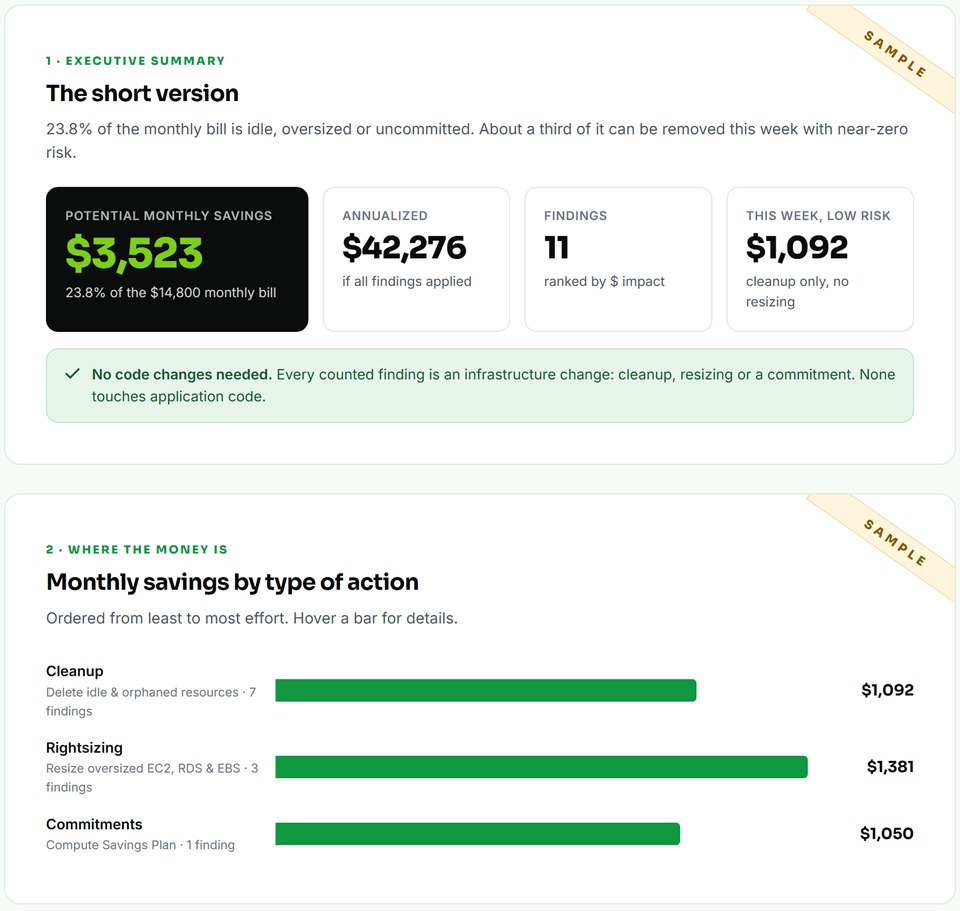
The audit is free: your potential monthly savings, how they split between cleanup, rightsizing and commitments, the biggest opportunities and their severity, and a snapshot of your stack. If you want help acting on it, the Cloud Optimization Engagement validates each opportunity against your environment, prioritizes them, and implements the ones you approve. It's scoped with you after you've seen your findings. Ongoing Cloud Optimization & Support is available after that. You decide after you've seen your findings.
When do I get my initial findings?
Within 24 hours of receiving your scan results, not from when you request the audit. The scan works from the cost and usage history AWS already keeps, so there's nothing to install and no waiting period.
How firm are the savings figures?
They're potential savings until validated. In the engagement, each one is checked against how the resource is actually used before it becomes a recommendation, and only the recommendations you approve are implemented. Savings Plans are sized on your usage after cleanup and rightsizing, never on today's bill alone.
What does Ongoing Cloud Optimization & Support include?
Recurring cost reviews, quarterly or yearly, each compared with your previous audit so you see what you fixed and what's new, plus ongoing optimization, infrastructure efficiency work and implementation support. We agree the scope and price with you before it starts.
Who makes the changes?
Nothing changes automatically: the audit is read-only. In the engagement, changes are made only for the opportunities you approve, in a window you choose, with a rollback step for each. Scripts run in dry-run mode by default (they only list what they would change) and take a snapshot before any deletion.
What if some resources are idle on purpose?
Tag them Environment=DR, CostScope=Exclude or exommerce:skip and the audit leaves them out: a disaster-recovery standby isn't waste. We also check for scheduled jobs, auto-scaling groups, DNS records pointing at a resource, and addresses partners may have allowlisted, before anything is recommended for removal. Tell us about any other tags you already use for this.
Do you support Azure and Google Cloud?
AWS is live today. Azure and Google Cloud are in final testing.
Join the waitlist and we'll notify you first.
What if our account spends less than $3,000/month?
The free audit still works. Below about $3,000 a month there's often too little waste for a paid engagement to be worth it, and we'll tell you so.
Can you sign an NDA or DPA?
Is there anything to remove afterwards?
No. The scan creates nothing in your account, so there's no role, user or agent to clean up. The only files are the results in your CloudShell, which you can delete whenever you like.
 available now
 Azure — waitlist
 Google Cloud — waitlist